
On the piston enable trace, set logging to full and trigger it again. Then post the green snapshot showing trace as well as the full logs. This will show us if the off command was sent and thus not processed by the device or if it was not sent at all for whatever reason.
Temp sensor & an outlet
nursenikki
#7

12/17/2019, 9:28:03 AM +807ms
+0ms ╔Received event [Houseboat].test = 1576592883806 with a delay of 0ms
+80ms ║RunTime Analysis CS > 20ms > PS > 41ms > PE > 20ms > CE
+83ms ║Runtime (39146 bytes) successfully initialized in 41ms (v0.3.110.20191009) (82ms)
+84ms ║╔Execution stage started
+96ms ║║Comparison (decimal) 16.5 is_less_than (integer) 10 = false (1ms)
+98ms ║║Condition #2 evaluated false (10ms)
+99ms ║║Condition group #1 evaluated false (state did not change) (11ms)
+112ms ║║Comparison (time) 34083909 is_between (time) 32460000 … (time) 33900000 = false (8ms)
+114ms ║║Condition #21 evaluated false (11ms)
+117ms ║║Cancelling statement #21’s schedules…
+122ms ║║Requesting time schedule wake up at Wed, Dec 18 2019 @ 9:01:00 AM EST
+126ms ║║Condition group #6 evaluated false (state did not change) (25ms)
+135ms ║║Comparison (decimal) 16.5 is_greater_than (integer) 20 = false (2ms)
+136ms ║║Condition #13 evaluated false (7ms)
+138ms ║║Condition group #10 evaluated false (state did not change) (8ms)
+141ms ║║Condition group #20 evaluated true (state did not change) (0ms)
+158ms ║╚Execution stage complete. (73ms)
+173ms ║Setting up scheduled job for Wed, Dec 18 2019 @ 9:01:00 AM EST (in 84776.021s)
+182ms ╚Event processed successfully (182ms)
Clear
Full
orangebucket
#8
Your piston is now using triggers so is only going to run when the motion sensor reports a change in the temperature. Nothing at all is going to happen just because of the time of day. Sometimes conditions are the correct solution …
At the moment what your piston says is:
When the temperature changes:
- If it has just dropped below 10C at any time, turn on switch 4.
- If it has just dropped below 17C and it is 4:01pm to 3:59am, turn on switch 4.
- If it has just risen above 20C at any time, turn off switch 4.
The bit about after 4am will not do anything as it has to be before 3:59am to get there.
So what exactly do you need it to do that it doesn’t at the moment?
nursenikki
#9
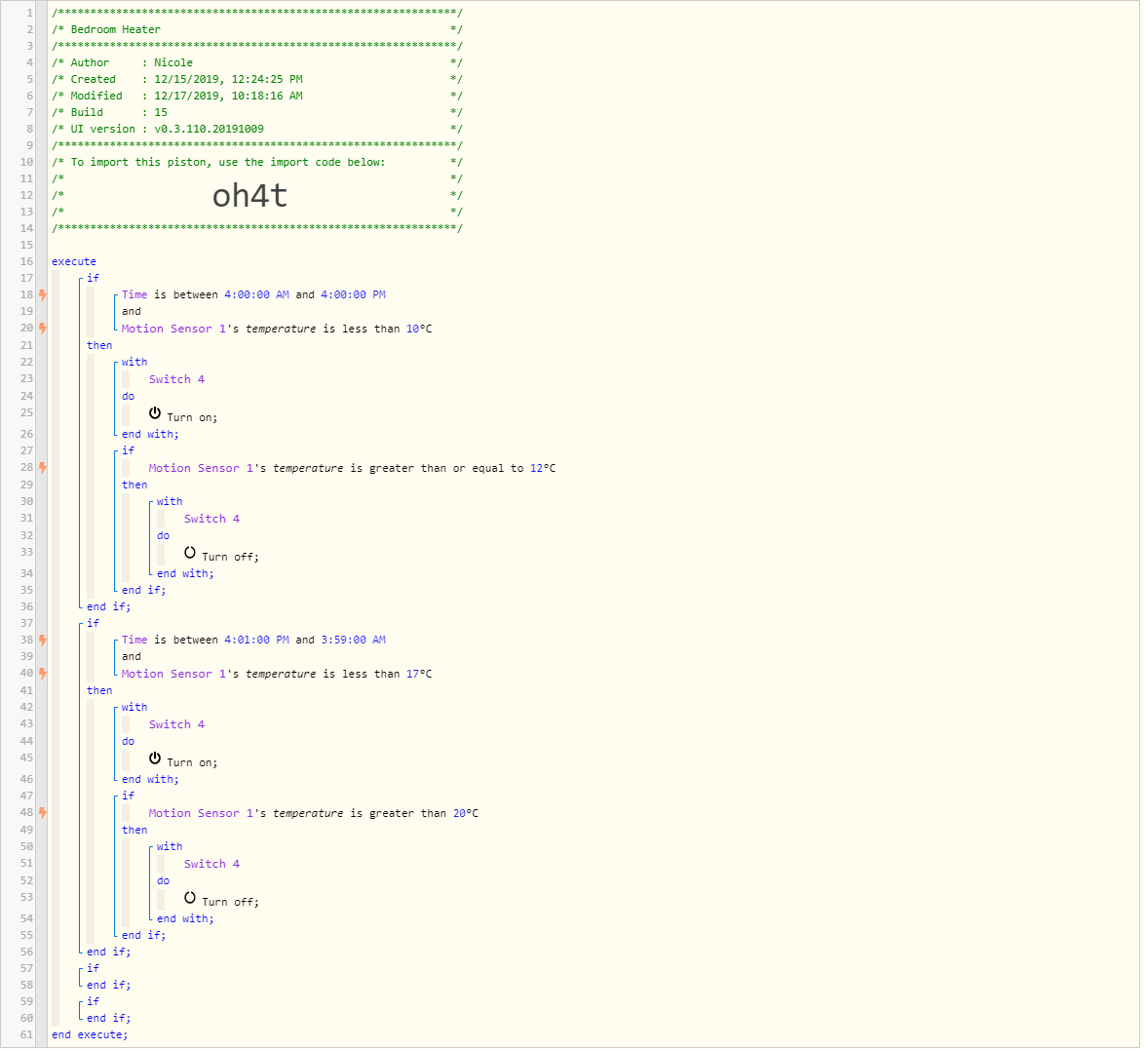
In the updated piston I changed back to conditions because for testing I changed the times to this morning and could not get the heater to come on when it was a trigger so I changed back to conticions and it came on
So for the most part its working with the original time of 4:01pm the heater comes on but at 3:59 the heater will not turn off. Thats when I added the condition after 4am turn off but that didnt work either
What should happen is
Between 4am and 4pm
heater come on when less than 10c
turn off when greater than 12c
Between 4:01pm and 3:59am
heater come on when less then 17c
Heater off when greater then 20
I changed the piston to hopefully to reflect that
nursenikki
#11
Thanks Llha63
Tried your piston last night with the same result. The heater should shut off after 4am the temp is 16c
but it doesent
Any ideas
WCmore
#13
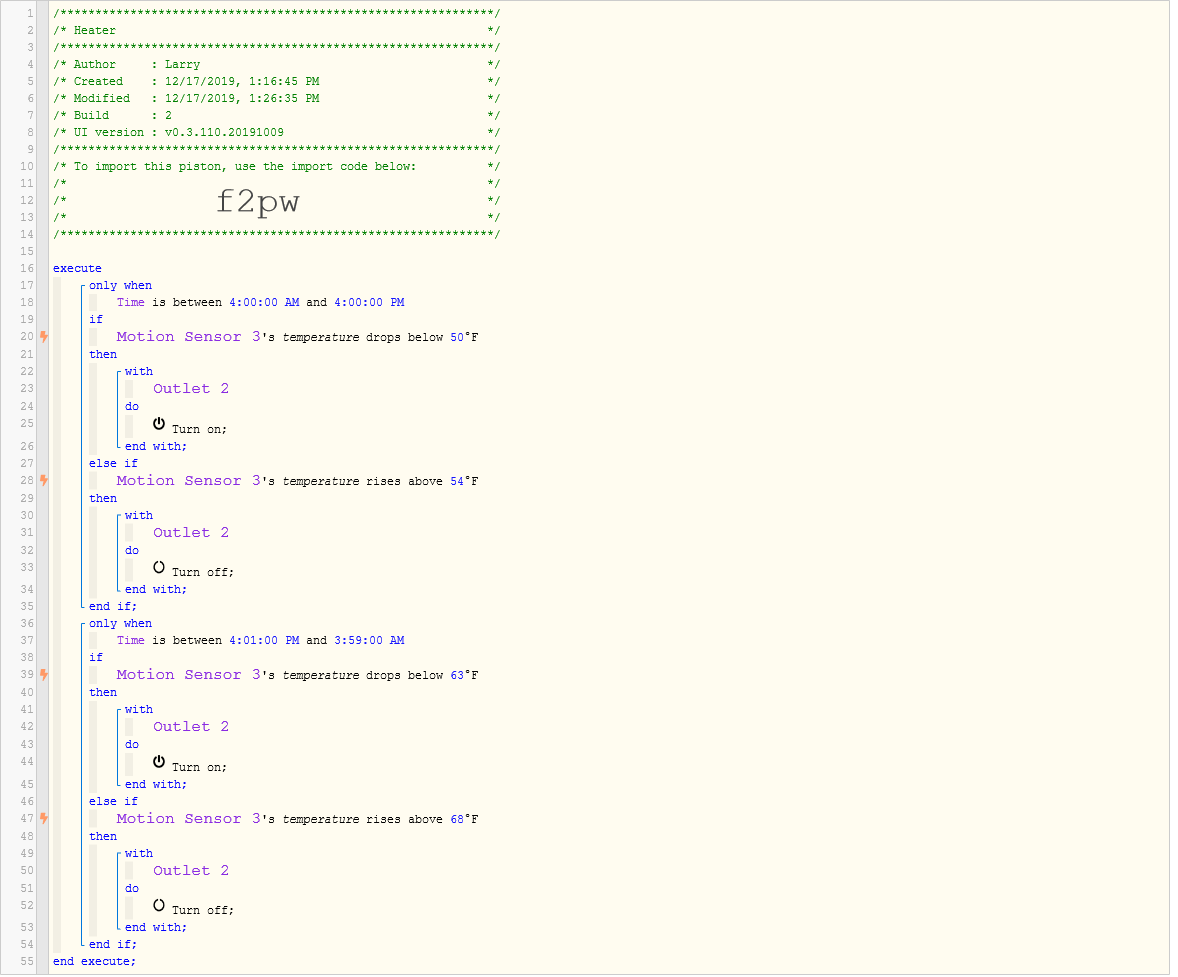
The code “drops below” and “rises above” are triggers. This means that they are only true for a brief moment.
For example:

This portion will only trigger when Sensor 3’s temp changes from 50 to 49… and only within your time restrictions. This means, if the temp drops that low at 3AM, the outlet will not be touched when 4 o’clock rolls around.
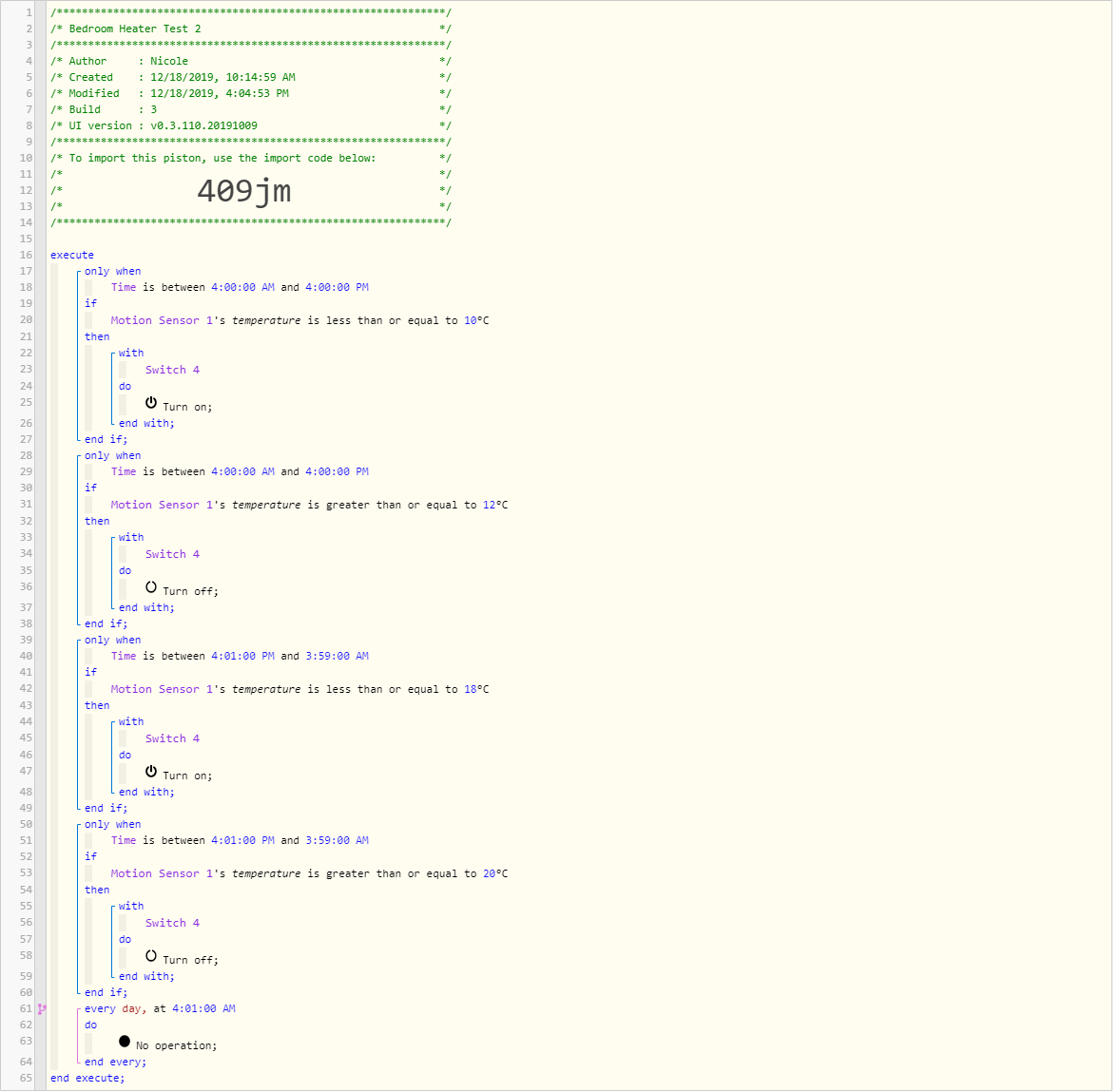
One way to get around this is to add a new block to the bottom:
Every day at 4:01AM
    Do something
END EVERY
nursenikki
#15
Would it be better if I seperated it into 2 seperate pistons one for each time period
I dont understand
Do something
END EVERY
nursenikki
#16
WCmore
#17
Sorry… Just walked in the door…
In this case, I meant the missing command, such as:
Every day at 4:01AM
    Do
        IF temp is greater than 16 degrees
            Then turn off heater
        END IF
END EVERY
Terminal
#18
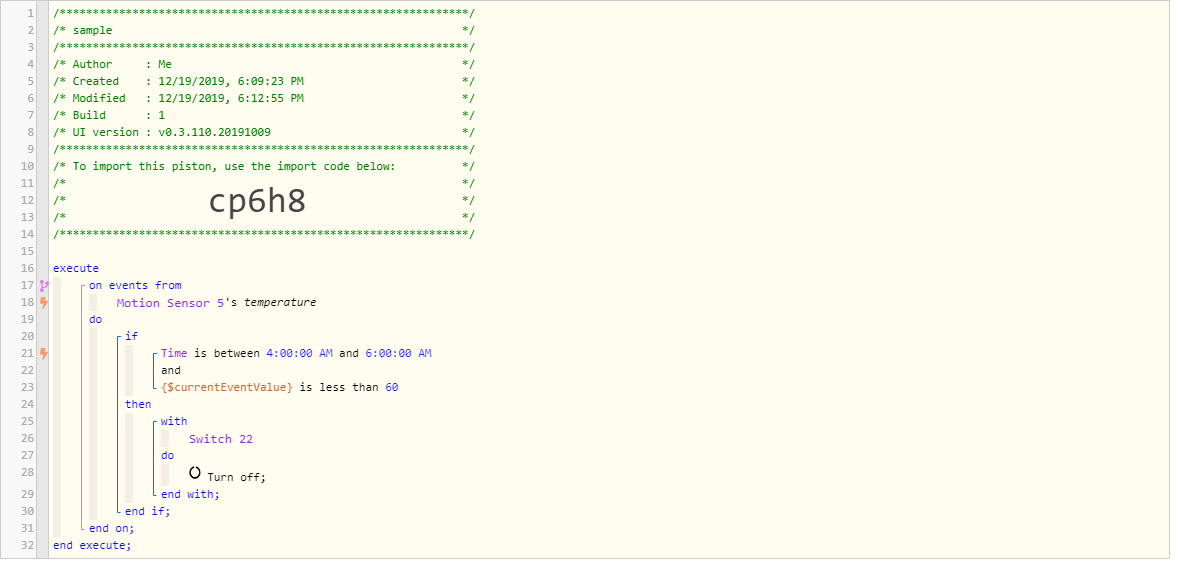
Perhaps an on event method would be a better way to go. Every time the temp changes on the sensor then look at the conditions and decide what to do.
WCmore
#20
@Terminal is correct… I did not notice that all four triggers were identical.
Here is one way to combine your four triggers into only one:
IF Sensor's temperature changes     <-- Trigger
Then
    IF Time is between X and Y      <-- Condition for specific time
    Then
        IF temp is less than T      <-- Condition for specific time
            Then Turn on
        END IF
        IF temp is greater than U   <-- Condition for specific time
            Then Turn off
        END IF
    ELSE
        IF temp is less than V      <-- Condition for OTHER times
            Then Turn on
        END IF
        IF temp is greater than W   <-- Condition for OTHER times
            Then Turn off
        END IF
    END IF
END IF
This method has only a single trigger (temperature changes)… The rest of the piston is just to determine which action (if any) is to take place.
nursenikki
#22
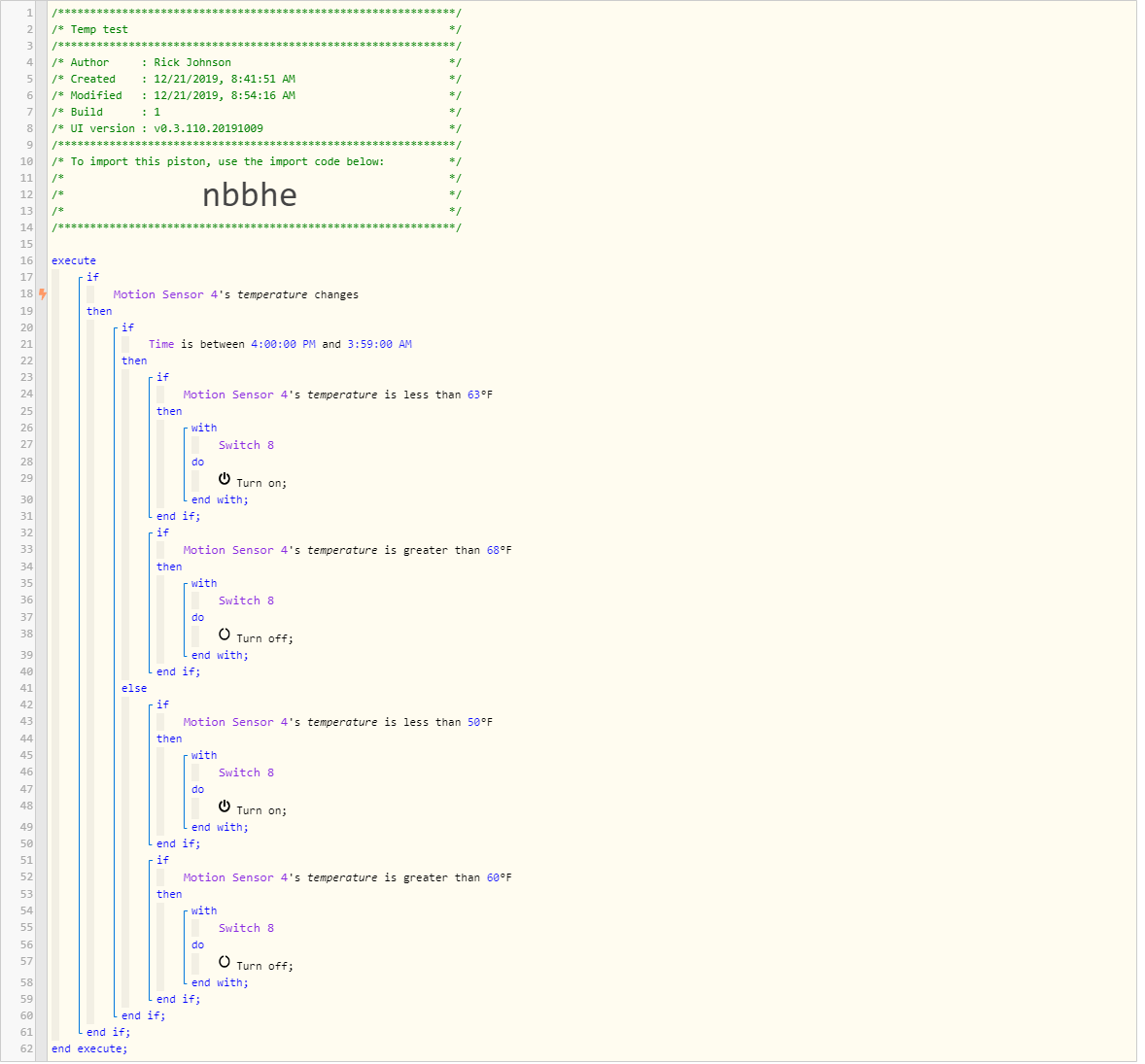
Thants Guys
I used WCmore’s example
I hope I got it right.
I dont understand how Motion Sensor 4 will work outside of the time 4pm to 3.59am
is it not part of the if
WCmore
#23
Every time the temperature changes (top trigger), the entire piston runs top to bottom, and executes any code allowed by your other conditions.
Essentially, the ELSE block covers the time range outside of line 21

(Nice job on nesting, @nursenikki… Most newbies would have had trouble with those indents)
WCmore
#24
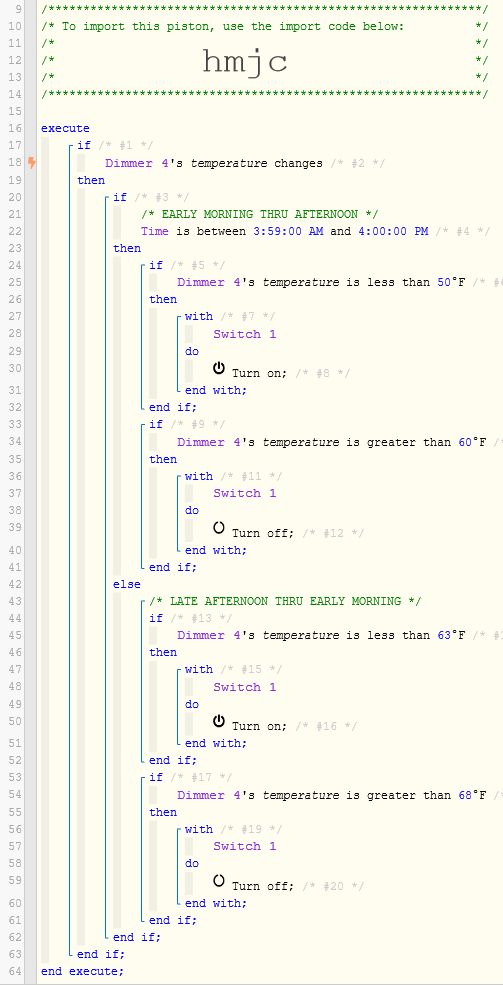
I noticed one small issue with your last piston, so I inverted the time below…
I try to avoid spanning across midnight, since it sometimes yields strange results. The following (inverted code) should cover each 12 hour block more reliably. (with added comments to assist)
nursenikki
#25
Thanks Ill give it a try tonight.
Is there a web article something that tells me how to use the IF, THEN, and the others
Nicole
WCmore
#26
This forum and the Wiki are the best places for learning.
Here are some of my favorite links.