Assigning A Piston To A Virtual Switch


#1

I want to include my virtual switch into my piston but I’m not sure how.

What I was like to happen is when the virtual switch is on, it sets the piston state to true and then when the virtual switch gets turned off, it sets the piston state to false. Another words, acting as the button listed in the piston. I want the virtual switch to mirror the button and vice versa.

Thank you in advance for your help. The main piston design is by @Gopack2


#2

My freetime is scarce this week, but I urge you to re-think this for a couple of reasons:

(1) Most buttons are off 99.9% of the time. (they only come on for a split second when pushed) This means any device mirroring the button will also be off 99.9% of the time. It also means a button of this type cannot mirror a regular switch.

(2) If we are talking two regular devices, it is fairly easy to get one device to mirror another… but… it becomes a real nightmare if you want it to go both ways. (in other words, in any given moment, how is SmartThings supposed to know if ‘A’ is mirroring ‘B’, or is ‘B’ mirroring ‘A’??)


All that being said, if you just need a switch to represent where you are in the piston above, you could add one line to the THEN block (turn on), and the opposite line in the ELSE block (turn off).

Perhaps you can clarify what you need an extra switch for?


#3

Will the else in this piston ever actually fire? What’s the false of a button being pushed? I think only the then part will fire for this rule. If the else does fire it’s going to be immediately after the then. Do you have logs of this piston firing?


#4

Let me rephrase this a bit. I want the virtual switch (not listed in the piston) to do what the button is doing.

Some context:

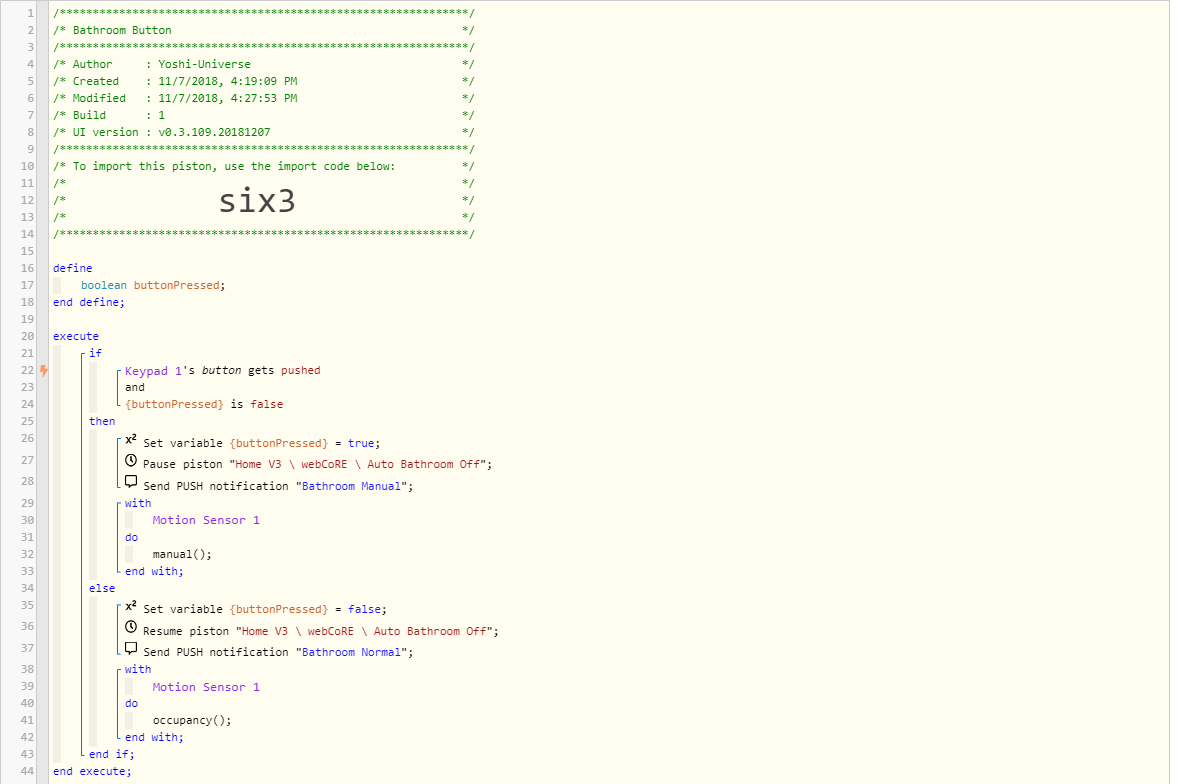
The button controls the light in my bathroom so it doesn’t go off when i’m in the shower. The only two ways to change the lights state is by the button or by going into the switch settings and changing it back. As there is no way to interact with the button other than physically pressing it, I want another way to control the switch’s mode. A virtual switch is something that allows me to use it however i want. So if I leave the house and tell the system to turn everything off, the bathroom virtual switch will be turned off and thus returning the bathroom light to normal.

The button and/or virtual switch need to be “aware” of each other’s state so that way when I push the button to change the bathroom to manual (ON), it toggles the virtual switch on. Then if I turn off the virtual switch, it resets the state for the button.

Hope this clears up what I’m trying to do.


#5

I think I understand you better now. You want an alternative way to push the button, without actually pushing the button…

Why not try some variation of this:

IF Keypad 1's button gets pushed
OR
Momentary Button gets pushed (your new virtual device)
Then
    IF {buttonPressed} is false
    Then
    Blah blah blah
    Else
    Blah blah blah
    END IF
END IF

I went with a “Momentary Button” instead of the usual “Simulated Switch” because it is most similar to a Keypads button. (always off, except for a split second when pushed) Since you are using it as a toggle instead of a switch, this logic makes sense to me.


All that being said, the path I usually choose for bathroom lights is something like this:
(done in your other piston)

IF motion changes to active
Then turn on lights
END IF

IF motion stays inactive for {integer} minutes
Then turn off lights
END IF

With this method, I can use a button (real or virtual) to change the variable, thereby changing the timeout on the lights. To me, this is more efficient than pausing and resuming a piston to “bypass” your coding.

#6

Yes, the only thing is that the button needs to act as a button and the switch, a switch.

So I need to have the button and switch working in unison. The button can just be a button and do button things but the switch needs to reflect the status of the lights mode. That way, i can look at my system and see what mode it’s in and tell my assistant to change to whatever status.

Virtual Switch = OFF = Bathroom normal
Virtual Switch = ON = Bathroom manual


#7

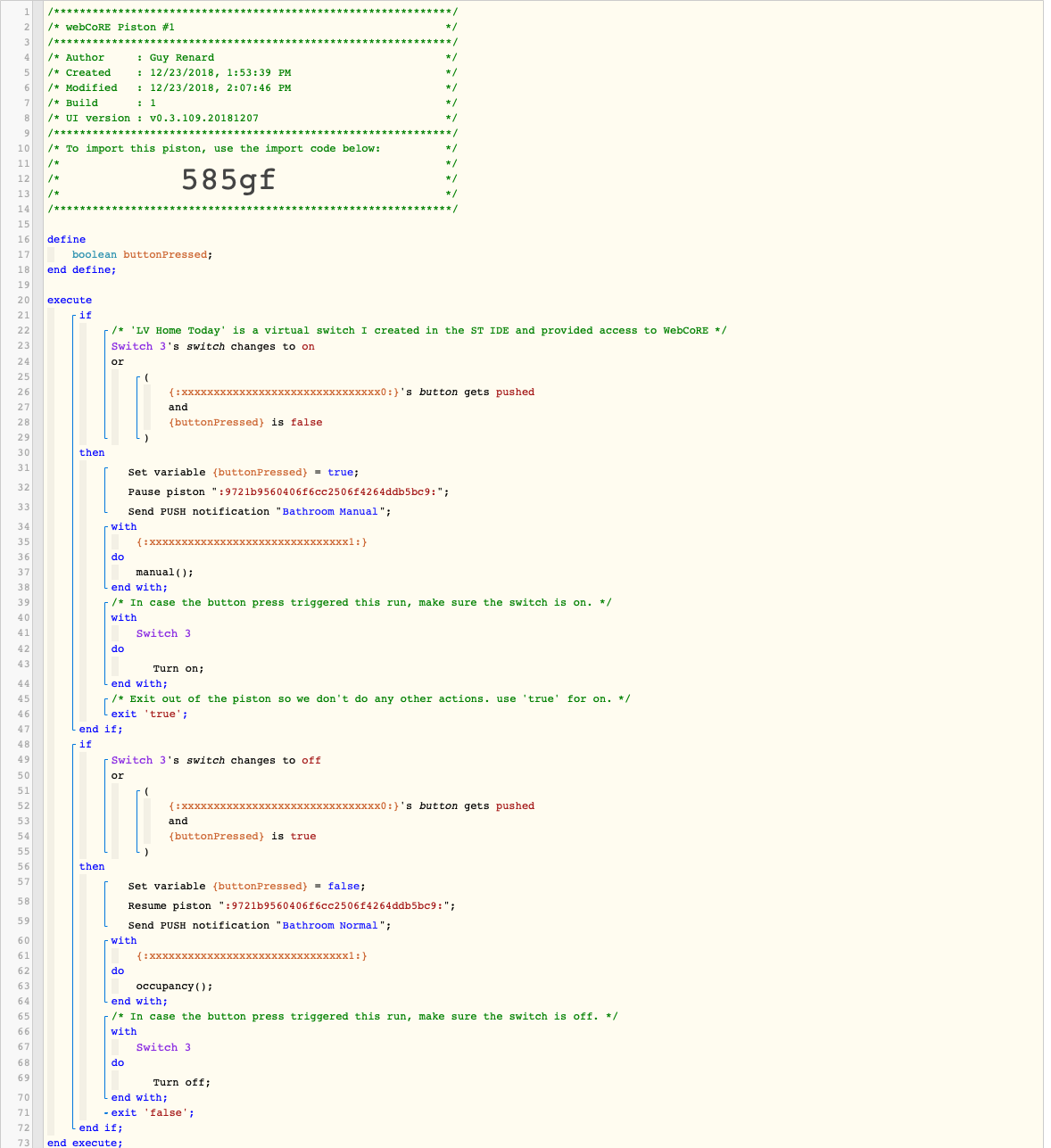
I think you just need to add in your switch and provide a little more robust logic. Try this. Note the 'xxxx’s are your original devices you will have to put in and replace my virtual switch with your own. Hope this helps.


#8

IT WORKS!

Thank you so much!

I’m still learning code logic, etc so I really appreciated the captions. I’ll continue to play with it and learn.

Thank you again!