Issues with WC when designing new pistons


#1

1) Give a description of the problem
Anyone else notice problems with WC while designing pistons?
Ive noticed several to the point I cant complete the piston design. Ive checked that I have the latest version of WC. Here are the problems Im seeing.

  1. drag/move drops the data and then it disappears. Then that elsif section will no longer build anything in that section.

  2. copy and paste cop’ys data but the button does not paste any data.

  3. Now im building a global variable and it will not take a value. It allows me to input and save but then shows unset no matter what I do.

this is getting frustrating… Ive already had to rebuild my entire instance of webocre because Pistons would not fire on schedules. Lucky that backup feature worked well.

#2

Open your instance of the webcore app in the ST app, go to Settings > clean up and rebuild data cache

See if that resolves the issue.

Otherwise you should post an image of the piston you are trying to create


#3

Im just trying to create a global variable. Maybe Im doing it wrong.

I have three global variables each with a cell phone number(type Dynamic). Now I want to create a global variable (@CellList) that will sources all three of those cellphone variables. That way if a phone number changes I only update in one place. I set it up as Dynamic type and using expression. It pulls each variable and evaluates it showing me the correct number. Im not sure how to separate each one so its a long number instead of three different numbers. but even if I source just one variable and hit save… its still save and then variable shows unset. I did clear the cahce and no change to the problem. Ive searched for examples but found none like what Im trying to do.


#4

My numbers are stored in dynamic globals… One per phone…
For the US, it is 10 digits, with no symbols


#5

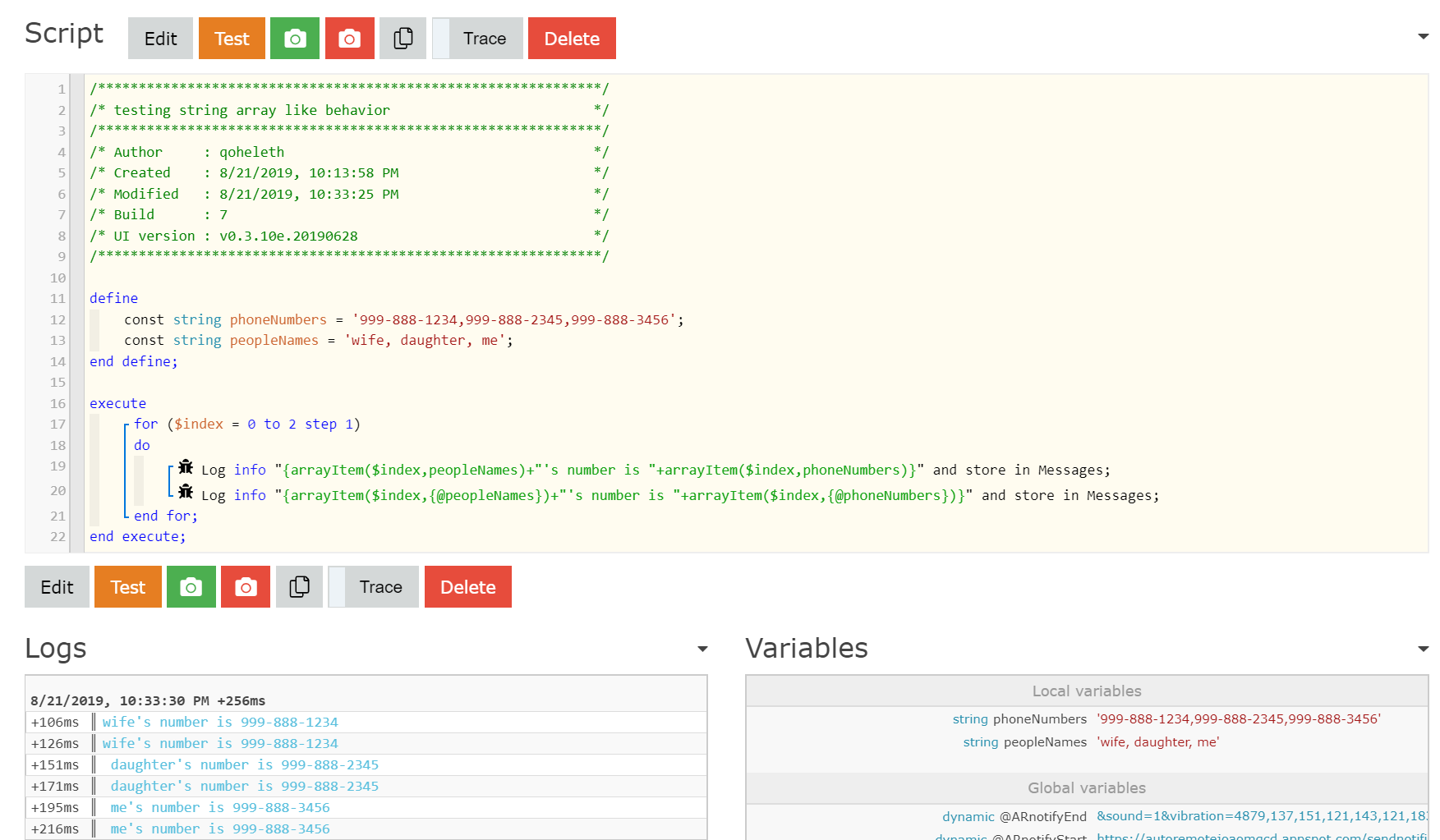
What I’ve done for a list of phone numbers is:
define
const string phoneNumbers = ‘999-888-1234,999-888-2345,999-888-3456’;
end define;
Then you can use arrayItem(index,phoneNumbers) to get the phone number you want. (I know, I didn’t expect arrayItem() to work that way either.)
BTW, I also have a string called peopleNames which gives me the first name of the person. phoneNumbers and peopleNames are in the same order as my device list.


#6

I am curious, @qoheleth, have you tested that concept with global variables, or only with local variables?


#7

To be sure, I only tested it on locals. Hang on… Yes. It works with both.


#8

That really gets my creative juices flowing… Thanks for sharing!!


#9

To be clear, I can add the global variables and after evaluation the phone numbers show up but there is no comma or separation. Not sure whats needed. I was in the process of playing with that when none of the data would even save. Which makes me think Im doing something wrong but ive also noticed issues in the past w/ WC as specified above.