Understanding Scheduling Timers


#9

Thanks - Im trying to understand the operation of these timers … there are times when I want to force the execution of the piston from the top at specific times. This is easy to do when the times are static, but I am setting the times based on a data table.

At this point, Im moved on to use my own timer list and starting the next timer when the previous one triggers. But still would like to understand why this example doesn’t work.

James


#10

I use a variable to do this all the time.

Wait {integerVariable} seconds


#11

You can also use variables as an adjustable time for execution like this:

temp

but the piston will not notice a change in the global until after it runs.
(so you’d have to account for that in your coding)


#12

The way I understand a Wait is that it pauses execution at that point in the piston (I have observed that behavior) … so I cannot use a wait as I am trying to restart the piston from the top.


#13

Just a tiny recap since I am not sure all of my responses registered:

webCoRE only schedules one wakeup per piston. (The nearest one)


I think this is because your only trigger is inside the loop, instead of outside it. I have never worked on a loop with a trigger inside. (only conditions)


In my opinion, using an integer (or time) variable is the way to go


Then your trigger needs to be at the top. (outside the loop) Just be aware that depending on your wording, the new trigger may cancel and start a new loop from square one, OR it may run a second loop asynchronously.


You are correct.


I think maybe I should also clarify one more peculiar behavior.

If you have a top level (non-indented) line that says:
Time happens at {timerTmp}
That time/schedule will not be seen or set until the piston is running.

In other words, to let a new variable time be seen by webCoRE, and scheduled for a wakeup, the piston has to run first, then see the new variable, then finish the code, and then set the wakeup to the new time.

To get around this, I sometimes cheat a bit and throw in a line like this.

every day at 8:00 AM
do
end every

(Yes, that block is completely empty)

This simple command simply forces the piston to schedule a wakeup based on the current variable.


#14

Yes I use similar constructions as well. Effectively, an empty “If time happens at:” does the same thing.

The mystery remains … I believe it must be due to the fact that the same “if time happens” statement is being used to schedule multiple events. Only one of the events is queued and the others are ignored.

Thanks! Hopefully someone can enlighten us :slight_smile:


#15

I think I know what is happening, but I would need to see your piston to clarify…


#16

I believe this only happens when you have multiple triggers in the piston… (in other words each trigger may schedule one wakeup, from what I have seen)


Is this a condition statement, or a trigger statement? There’s a huge difference in the way it plays out


I would love to see this code please… It goes against everything I have ever seen with webCoRE, but would love to learn more.


#17

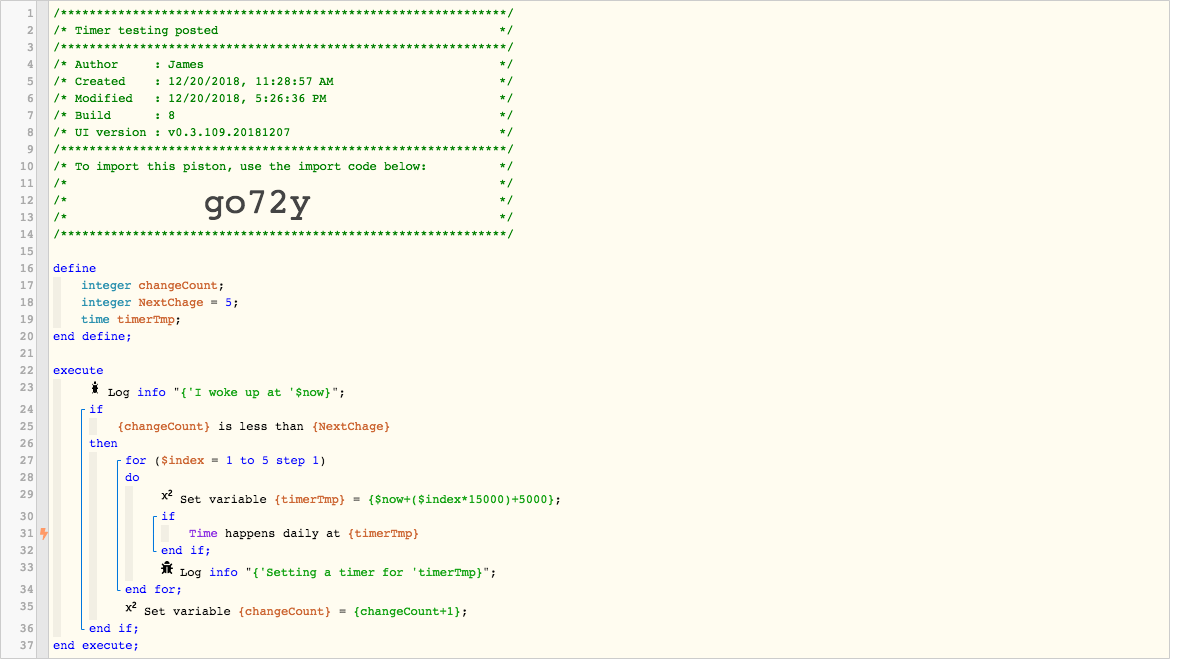
Hi @WCmore - Thanks for the help … I think we should return to the original issue with the code posted at the top… I’ve done many tests and it does appear that timers are not always scheduled (or queued as a job) when the “If Time Happens” is done as a for loop. If you download that code you will see what I mean.

If I placed 2 or more “If Time Happens” directly inline with each other (i.e. not in a for loop), the timers are all scheduled and queued as one would expect.

Not sure why this limitation exist, or if there is an obvious way around it.


#18

I have explained every issue you have mentioned… Why won’t you post a green snapshot of the things you just mentioned? It makes no sense, and neither of us can learn if it is kept hidden.

For clarification, a trigger is a split moment in time. On the other hand, a condition can be a long stretch of time. I suspect you may have your terminology mixed up… Perhaps you meant “conditions inside a nested IF”.

Consider this simple piston:

IF the front door changes to open  <-- Trigger (split moment in time)
    Then Wait 5 seconds
    IF Light changes to on         <-- Trigger (split moment in time)
        Then send SMS
    END IF
END IF

Can you see that you could test this piston a thousand times, and the SMS will never be sent unless the light is turned on exactly 5000 milliseconds after the door opens?? Triggers do not belong inside an IF trigger. It is better to put conditions inside the IF.

The proper way for this quick example is this:

IF the front door changes to open  <-- Trigger (split moment in time)
    Then Wait 5 seconds
    IF Light *IS* on               <-- Condition (long lasting)
        Then send SMS
    END IF
END IF

This method would work everytime!

If you are unwilling to go into any details with the statements you made in the last couple of posts, then I will disregard all those statements, and will encourage others to ignore it as well, or they will have a nightmare with their pistons.

Personally, I would rather learn and teach good practices. Since your pistons aren’t working, perhaps there is some truth to what I have been saying…


#19

Have you downloaded and tried the piston I referenced? I am very familiar with conditions and triggers … and that is a tangent issue to what I am talking about. It sounds like you may not want to help out here which is fine. I am just trying to understand how Webcore deals with the case I posted.

Thanks!


#20

It will not download. Probably corrupted


#21

I have bent over backwards to help, and you have dismissed everything I have said, and made no changes to your code whatsoever.

I can only talk to a wall for so long before I wander off…


#22

Here you go:


#23

*sighs*

Ten hours worth of conversation, and not a single thing I mentioned is in your piston…


#24

If you don’t want to help that’s fine … it seems strange you’re getting defensive. All I am focused on is the specific problem in my post.

Thanks!


#25

I want to help, or I would not have invested this much time with you. But when you ignore every single thing I say, and do not follow any of my advice, I loose interest in wasting any more time.

No hard feelings


#26

I dont think you have actually tried to run the piston or you would not be off on tangents. There is a specific issue I am bringing up here.

I welcome others you may have expertise that can offer some pointers. This is a specific detail that you may not be familiar with, but thanks for taking the time!

James


#27

Your first import code was corrupt. This new one came thru. Testing now


#28

ok thanks! Not sure what I did wrong posting it :slight_smile: