Help designing weather and time controlled piston


#1

1) Give a description of the problem
I want a piston that will turn on a switch during a certain time of day, and also if a certain weather event exists. I have a zwave switch that turns on/off an electric socket. Plugged into the socket is a light and a heated mat.

2) What is the expected behaviour?
The switch is on from 4pm to 11:30pm. AND - the switch is on if (Weather Underground? Accuweather?) says it is snowing, no matter what time of day. I know that means the mat will be on from 4pm to 11:30pm regardless of weather, that’s ok. And I know that means the light will be on any time it snows, even during the day, and that’s fine too. We remove this light and unplug the mat when Winter is over!

I know how to design a piston for the time part. I have no idea how to integrate weather or how to integrate it with the time constraint (or - ignoring the time constraint?).
#2

I don’t use anything weather related so I’m no good on that part… But for the time stuff you can either use a TIMER or TIME BETWEEN.

And if you want to ignore that sometimes, you need to get your hand dirty with variables.

Everyday at 4.00pm
AND
IF variable heater= true
Then
Do this do that

Everyday at 11.30pm
With zwave switch
Do turn OFF


#3

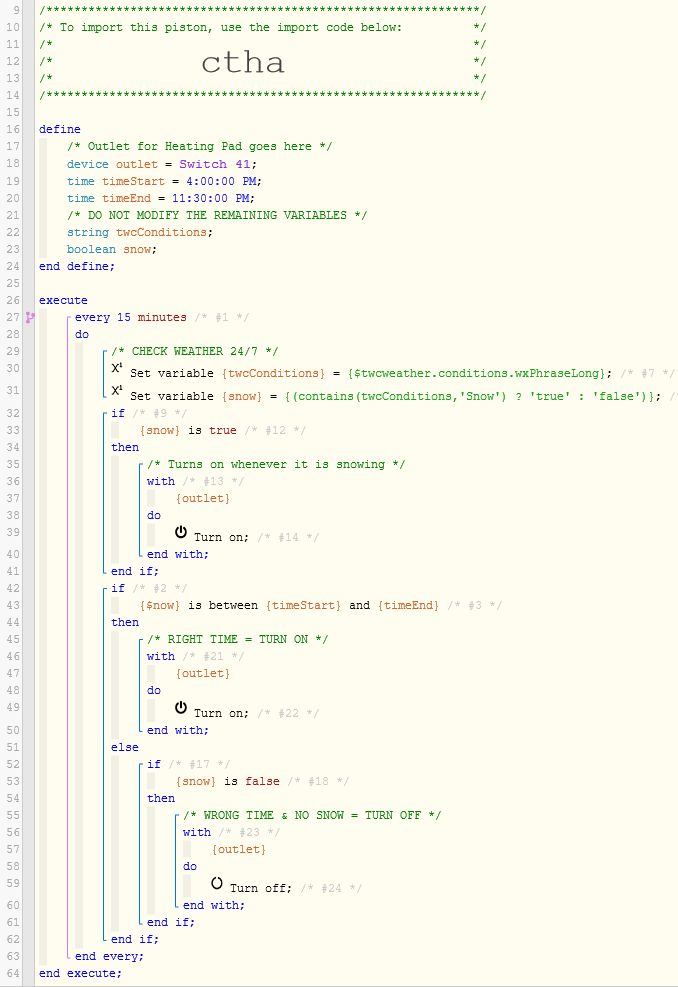
The tricky part is, no $TWC weather occurrence can alert us automatically. We actually have to make a request to see what the current weather is. Here is a piston that runs every 15 minutes, and takes action based on your request:

You can read more about $twcweather.conditions here


Pro Tip:

Once you have tested and are happy, I would highly recommend adding another condition to only turn it on if someone is HOME. For safety reasons, I try to avoid running portable heating elements when nobody is home…


#4

Wheeeooo! Cool, thank you!!! I read through it and went line by line until I understand it. And yeah, that makes sense to not use the mat when nobody’s here. Luckily not normally the case - as I work from home, but I get your point.

Boy howdy I wish “snow” and “$now” weren’t so alike! Took me a bit in a couple places to see that!

I’m looking at the WIKI you linked for TWC, the “Phrase Long”. That’s really quite cool! Is TWC accurate for my particular area, I’m wondering? I just ask because I’m nowhere near a major city or airport or anything. I have a weather station with weather underground but it’s only temperature/wind/humidity/rain, not snow. Oh, and curious - why phrase long, and not medium or short?


#5

Not sure… It is based on the location that you told SmartThings in the IDE.
(and I assume the nearest weather station to that)


Medium and Short might abbreviate occasionally. We want the entire word “Snow” spelled out, or the piston will fail.

Pro Tip:
This is our first Winter using TWC, so we have not discovered all of the “Snow” alerts yet…


#6

Hello! This has been humming along beautifully - TWC has so far been accurate for me.

Now, one more thing - the holidays are over! I only want the snow trigger, I want to remove the “turn on if it’s between TIME”.

I THINK I simply need to remove lines 14, 15, 41-55, and remove “WRONG TIME” from line 61.

Is that correct? And - I’m going to make a copy of this as is so I can use it next year.


#7

I cannot see the piston or the lines you are referring to.


#8

The one you so very kindly posted for me above, 19 days ago!


#9

In my picture above, line 14 is:
/**********************************************/
and line 15 is blank…

Can you repost your question using the numbers above, please?


#10

Ohhh, sorry 'bout that!!!

Ok, I just want the snow part - I want to remove all the time constraints.

So remove lines 19 and 21, 43-51, move 52 - 61 to above the “else”, and remove the (current) line 55.


#11

Lines 21 & 55 are comments (in green text). These (optional) lines will not execute, but are only notes for your convenience.


Otherwise, your ideas look solid…

Although, truth be told, I would probably cheat and simply change the start time to 12:00 AM, and the end time to 11:59 PM. That will essentially make it work all day, without any butchering of the code.
(it also makes it easy to revert back to some other times in the future)


#12

I wanted to butcher the code, simply because I need more practice at getting my hands dirty manipulating code. I made a copy and named it “Regular Winter Mat Schedule” instead of “Christmas Winter Mat Schedule” (Which I have paused and will use the Regular instead.).
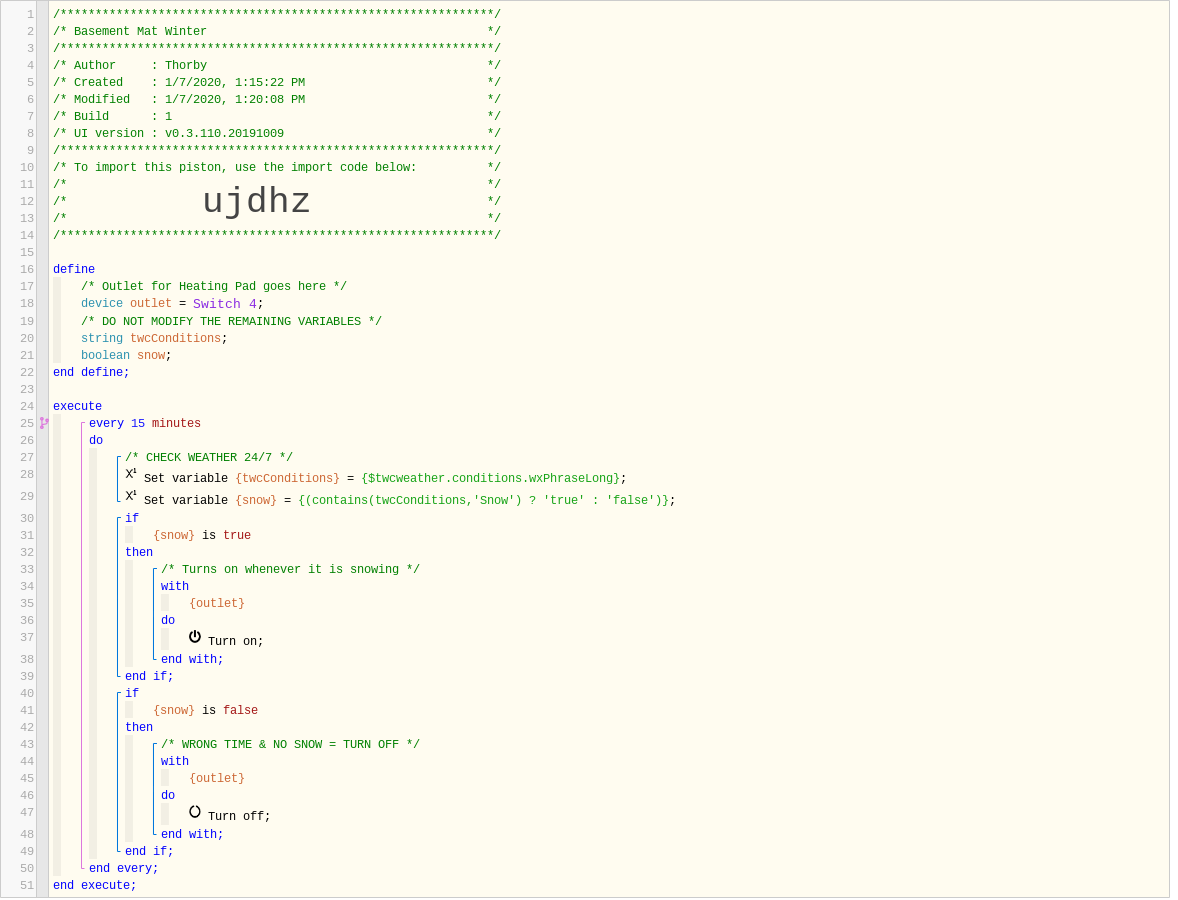
So this is what I ended up with:


I think that’ll do it.
Can you tell me - how to edit green optional text, and how to add it in the future?


#13

Piston ujdhz looks good!

As a safety precaution, I would encourage you to add extra conditions so it does not run when you are asleep or outside the house.


#14

Thanks!
And the heat pad has a physical switch that I use when the house is unattended.


#15

Smart! Thanks for elaborating. I always have this concern that one of my pistons might cause problems in the wrong hands…


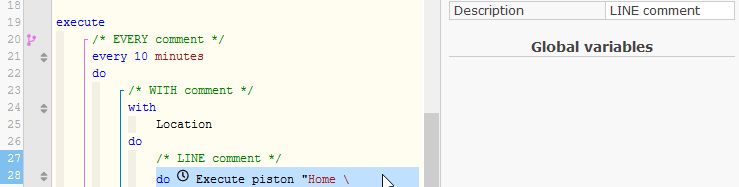
When in Edit mode, you can click to the right of most lines (which selects, as seen in the left margin). Once selected, you can type in the “Description” box in the top right to add a comment.